USB-C Hubs for Corporate Gifts: Why More Ports Do Not Guarantee More Usable Functions
Published · Updated · Written by Product & Production Review Desk
Written by: Emirates Tech Works Product & Production Review Desk
Reviewed by: Emirates Tech Works Procurement Editorial Team (Procurement relevance review). This is an organisational review role, not an individual endorsement.
For a UAE corporate tech-gift programme, a USB-C hub with HDMI, Ethernet, USB-A, USB-C and card-reader ports does not guarantee that every recipient can use every port at the printed resolution, speed or charging level. The correct buying decision is to define the recipient host capability and simultaneous-use scenario first, then approve the hub as a configured function map rather than as a count of connectors.
The decision variable is hub port count and port labelling versus host capability and function allocation
A multi-port USB-C hub is easy to overvalue during procurement. It looks broadly useful, carries several familiar connectors and can make a desk or travel kit appear more substantial than a power bank alone. The specification sheet might list HDMI, USB-C, USB-A, Ethernet and memory-card access in a compact housing. The mistake starts when that connector inventory is treated as a list of functions that every recipient will receive.
A hub does not create capabilities that are absent from the host device. It distributes, converts or extends the functions that the connected laptop, tablet or other host can provide under the relevant connection mode, power condition, operating system and driver state. A host USB-C port may carry data but not video; it may support one external display rather than two; it may provide insufficient bus power for several peripherals; or it may support video with a limit that changes when high-speed USB traffic is also required.
Microsoft states that its Surface USB-C Travel Hub requires a host USB-C port supporting USB-C Alt Mode microsoft-travel-hub. Dell likewise advises confirming that a laptop supports USB-C with DisplayPort Alternate Mode before connecting a universal USB dock dell-docks. These statements establish a practical rule for corporate buyers: a hub’s HDMI socket proves only that the hub has an HDMI output. It does not prove that a recipient’s USB-C host can send the video signal needed to use it.
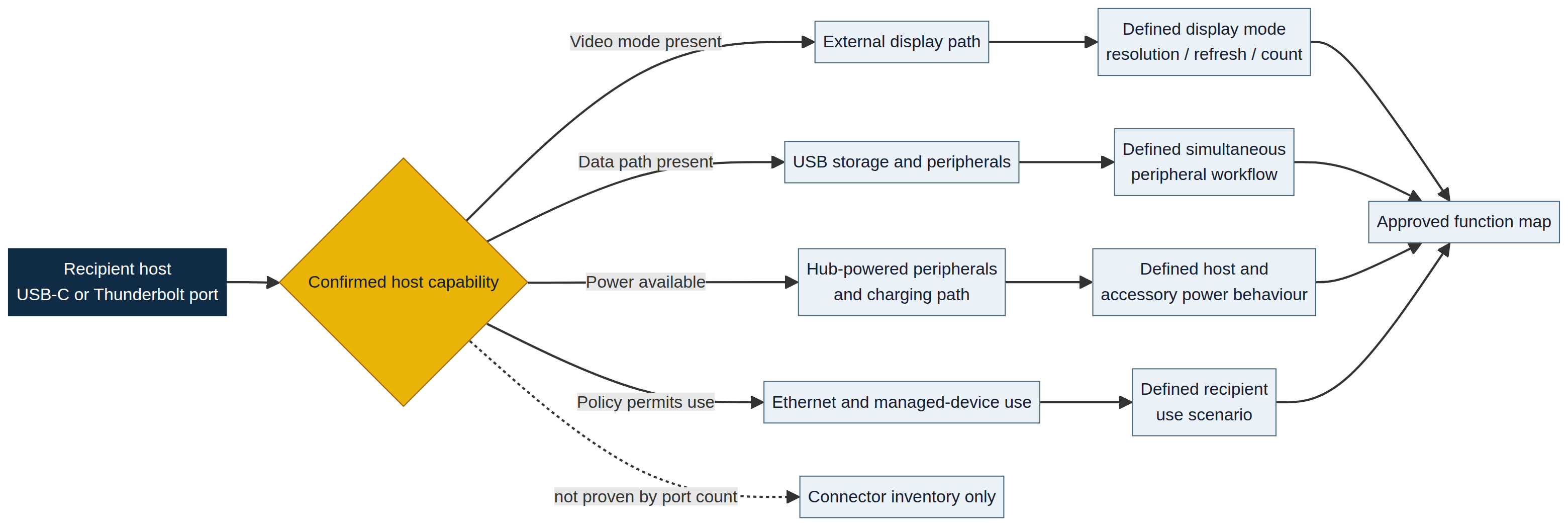
Key takeaways
> - A USB-C hub is a host-dependent accessory: its ports do not establish the capabilities of the recipient laptop, tablet or phone. > - External-display claims require confirmation of the host video mode, graphics/display limit, hub configuration, cable path and intended resolution/refresh rate. > - Shared host power can change what a hub can do at the same time; a port may physically exist while its speed, charging output or concurrent use is constrained. > - A corporate gift brief should specify a recipient scenario—such as one HDMI display plus keyboard, mouse and Ethernet—rather than approving a hub solely because it has many ports.
Why more connectors do not equal more concurrent functions
A hub has a finite upstream connection to the recipient host. The downstream connectors are routes sharing that connection, not independent guarantees. If the intended use includes a display, external storage, Ethernet, keyboard, mouse and charging, the buyer needs to understand which functions are expected at the same time and what the particular host can supply.
Microsoft’s Surface USB-C Travel Hub provides a concrete, model-specific example. The following 15W, 7.5W and below-7.5W outcomes apply to that Microsoft hub, not to all hubs. Its published specifications distinguish what happens when the hub is connected to a 15W host USB-C port, a 7.5W host port or a port below that level. At 15W, its USB and USB-C downstream ports can operate together at USB 3.2 Gen 2 speeds; at 7.5W, only one may be used at a time and the maximum is limited to USB 2.0; below 7.5W, the downstream USB-C port cannot be used microsoft-travel-hub. Other hub models require their own documentation and scenario test. The example demonstrates why a generic phrase such as “two high-speed USB ports” is not a complete procurement requirement without the upstream condition.
| What the hub advertises | What it can indicate | What it does not settle | Buyer question before approval |
|---|---|---|---|
| HDMI output | The hub has a physical display connector | Whether the host USB-C port can send video, which resolution is available, or whether another display can work simultaneously | Which host models and one-screen or multi-screen scenario will recipients actually use? |
| Two USB-A ports and one USB-C port | The hub offers peripheral connections | Simultaneous data speed, bus-power availability or display trade-offs | What peripherals must work at once, and what host power/data condition is assumed? |
| 1Gbps Ethernet | The hub includes a network interface capable of that stated link rate | That the recipient’s managed host, network environment and connected infrastructure will permit the intended use | Is wired network access a real recipient task, and can the host/environment support it? |
| PD pass-through input | A pathway exists for power to enter the hub | Laptop charging wattage after hub overhead, source capability or device acceptance | What charger, source rating, cable and recipient device are part of the tested path? |
| Dual display ports | The housing exposes two display connectors | That both can be active or that the host supports their claimed modes | Does the host support the target display count and configuration? |
In practice, this is where the decision is routinely misjudged. The procurement room tests a hub with the supplier laptop, the supplier monitor and the supplier power supply. Each connector is demonstrated one after another. The recipient, however, uses a particular corporate laptop with an internal display, a security-managed operating system, one available USB-C port and an existing monitor. The relevant acceptance test is not “Does the hub have these ports?” It is “Does the expected set of recipient functions work together on the actual host group?”
External-display capability belongs to the host-and-hub path
An HDMI port on a hub is an output endpoint, not proof of external-display capability. Video reaches it only when the host, upstream connection and hub are able to establish the required path. DisplayPort Alternate Mode is one way that USB-C can carry native video. VESA explains that DisplayPort Alt Mode enables DisplayPort video through USB-C, and that its available high-speed lanes may be allocated between video and simultaneous SuperSpeed USB data in particular configurations vesa-alt-mode. The practical implication is that display use and high-speed peripheral use should not be assumed to be independent merely because the hub has separate physical sockets.
A buyer should also separate a hub’s display count from the host’s display maximum. Apple documents that a supported hub or display daisy chain can put multiple displays through a single Thunderbolt port, but does not increase the maximum number of displays supported by the Mac model apple-displays. This is an important safeguard for executive or IT-adjacent gift programmes. A dual-display hub can be a valid product; it is not a universal promise that every recipient laptop can run two external monitors at the stated mode.
| Display claim in a hub brief | Host-side condition to verify | What should be tested | Risk if omitted |
|---|---|---|---|
| “4K HDMI” | Host supports video output through the intended USB-C/Thunderbolt port and the target display mode | Representative laptop, actual monitor, supplied cable and chosen refresh/resolution | No picture, lower mode or a support case framed as a defective hub |
| “Dual display” | Host graphics and port capability support the intended number of external screens | The exact two-monitor arrangement, not two separate one-monitor tests | Only one display works, or the recipient receives a mode outside the programme promise |
| “One cable desk setup” | Host accepts the hub/dock’s charging path and has the required video/data functionality | Charging, monitor, Ethernet and input devices together | Display works in isolation but fails after normal peripherals are attached |
| “USB-C display output” | Downstream USB-C port is explicitly capable of video output in the named configuration | A USB-C display or adapter on the production-intent hub | Recipient assumes every USB-C port carries video when it is data-only |
| “High refresh or high resolution” | Host, hub, cable and display each support the exact advertised mode | The complete path at the stated resolution and refresh rate | Marketing wording survives while the practical desk experience does not |
Microsoft’s travel-hub documentation makes the same distinction at port level: its downstream USB-C port supports compatible USB-C peripherals but does not support video output or laptop charging microsoft-travel-hub. This is precisely the kind of limitation that gets lost when a corporate gift is described as a “USB-C hub.” The term accurately names the product category but does not describe every downstream port function.
The USB-C cable specification guide addresses why a matching plug cannot establish cable power, data or display capability. The hub decision adds another layer: even a correctly specified cable cannot make a recipient host provide display functions or support more monitors than the host permits.
Power, data and video compete within a real use scenario
A hub is often chosen to make one laptop connection perform several jobs: receive power, feed a display, connect storage, provide Ethernet and support input devices. That is a useful design goal, but it is also where the source of each function is easily blurred.
The hub may accept a charger through a PD input, but the laptop must accept the resulting charging path. A PD input label alone does not establish a delivered laptop-charging result: the exact hub model, charger, cable and host need to be checked together. Dell notes that docking-station power-delivery specifications vary by model and that a laptop with a higher power requirement may need its own adapter to operate at full performance dell-docks. The hub may provide several data ports, while the host’s available upstream connection and active display configuration determine what performance is observable. An Ethernet port likewise establishes hardware presence, not that a recipient’s managed host and desk/network environment have been validated for the intended workflow.
Dell makes this scope explicit in its dock guidance. It distinguishes universal USB docks, Thunderbolt docks and multiport adapters; it says multiport adapters generally provide essential connectivity for mobile use, while the expected display number and charging result vary by dock model and laptop graphics or power capability dell-docks. That distinction helps prevent an overstated gift promise. A compact branded hub can be excellent for a single-monitor travel setup without being an appropriate substitute for a powered workstation dock.
| Recipient programme | Minimum scenario to define | Evidence that matters | Misjudgement to avoid |
|---|---|---|---|
| Conference speaker or presenter kit | One external display plus an input device | Host video capability, one monitor test, hub cable and adapter compatibility | Approving a dual-screen hub because it looks more premium than the use case needs |
| Executive travel gift | Hotel or meeting-room display plus basic USB accessories | Common display adapter/monitor path, one-port host behaviour and packing usability | Assuming hotel display support follows from a hub HDMI port alone |
| Hybrid-office workstation gift | Monitor, Ethernet, keyboard/mouse, external storage and laptop charging at once | Complete simultaneous-use test on representative corporate laptops | Testing every port one by one but never testing the combined desk workflow |
| General employee appreciation item | Clearly limited, simple function such as storage access or one monitor | Recipient device distribution and plain language for the supported task | Giving a multi-port hub to a mixed population whose devices and needs are unknown |
| IT-approved accessory programme | Named host models and permitted peripheral/display scenarios | Model-level compatibility evidence, firmware/support route and change controls | Treating a generic gift sample as equivalent to a managed IT accessory |
This is not an argument that every corporate hub needs an enterprise docking-station programme. It is a request to match the evidence to the promise. When the gift will be positioned as a compact accessory for one intended task, a narrow, tested configuration can be enough. When it will be described as a travel workstation or multi-monitor solution, the specification needs to become more explicit.
Port labels need a function map, not only a connector map
The front or side of a hub may show several labels, but they are often interpreted too quickly. “USB-C” can mean upstream host connection, downstream data, power input, a charging-only path or a port whose exact functionality is dependent on the model. “USB 3.2” can describe a stated data capability but does not independently prove the recipient host will supply the necessary upstream condition during a full workflow. “HDMI” does not state which host video protocol must be present.
The right procurement document is therefore a function map. It should link each visible connector to the actual task it will support, the upstream host condition, the supporting cable or power source and the limitation that needs to appear in the user-facing description. The map is more useful than an expanded connector list because it exposes gaps before production.
| Hub element | Function map entry | Supporting condition | Recipient-facing description that remains accurate |
|---|---|---|---|
| Captive USB-C lead or upstream port | Connects hub to recipient host | Host port supports the required data/video/power functions | “Connects the hub to compatible USB-C hosts” |
| HDMI | External display connection | Host video output and the defined display mode are supported | “HDMI display output for verified compatible host configurations” |
| USB-A / USB-C data ports | Peripheral/storage connection | Stated data path and upstream condition support the intended use | “USB ports for compatible peripherals and storage” |
| USB-C PD input | Power enters hub and may be passed to host | Compatible charger, cable, hub path and host acceptance | “USB-C power input; laptop charging depends on the connected system” |
| Ethernet | Wired network connection | Network, driver and host environment permit use | “Wired Ethernet for compatible hosts and networks” |
| Card reader | Reads the stated card format | Host and operating system can access the device | “Card reader for supported card formats” |
Microsoft’s USB overview reinforces why this care matters: it notes that USB-C cables on newer standards can differ in data speed, display support and charging capability microsoft-usb. The same discipline applies to hubs. A correct product description identifies functions by condition instead of treating connector type as a complete performance statement.
The product identity and packaging guide explains why a polished presentation box cannot replace accessible product information. For hubs, a short capability card or QR-linked configuration note can be more useful than a generic port diagram. It can tell recipients which port is for power input, whether a USB-C port is data-only and which expected host setup has been verified.
A four-layer acceptance test prevents demonstration bias
The strongest hub test does not begin with a long specification checklist. It begins with the recipient scenario and validates four connected layers: host, hub, supporting accessories and simultaneous tasks. This avoids the familiar demonstration bias in which every connector works separately in a controlled sample environment, while the intended combined workflow has never been tried.
- Host layer: Define representative recipient devices by model family or capability class. Identify whether their relevant USB-C or Thunderbolt ports provide the video, data and charging functions the programme expects. For mixed fleets, establish the lowest acceptable supported scenario rather than testing only the most capable laptop.
- Hub layer: Confirm the production-intent hub model, captive lead or included upstream cable, port map, firmware condition where applicable and claimed display/data/power scope. A port count is not the acceptance record; its documented function is.
- Support layer: Use the actual charger, display, Ethernet cable, storage device and any adapters that will appear in the recipient experience. The PD wattage decision guide is relevant where a hub will accept external power or be paired with a power bank: source rating, cable and device negotiation must be considered together.
- Simultaneous-use layer: Test the scenario as it will be used. For a travel hub, that might be one external display plus a USB receiver and storage. For a hybrid desk kit, it might be display, Ethernet, keyboard/mouse, storage and laptop charging together. Record the observed resolution, peripheral access, network link, host charging state and any limitation that must be disclosed.
| Test stage | Single-port demonstration | Scenario-based acceptance | Decision value |
|---|---|---|---|
| Display | HDMI picture appears on supplier laptop | Intended host/monitor mode works with expected peripherals attached | Reveals host limit, video mode and bandwidth allocation issues |
| USB data | A flash drive mounts | Target storage/peripheral task remains responsive during intended display/network use | Reveals shared-path or host-condition constraints |
| Power | Charger indicator appears | Recipient host receives the expected charging behaviour during full hub use | Separates source headline rating from delivered system result |
| Ethernet | Link light is visible | Corporate network/desk condition provides expected wired connection | Separates hardware port presence from usable deployment context |
| Support | Supplier knows the test setup | Buyer retains model, lot, port map and limitation record | Prevents vague post-delivery diagnosis |
The article on recipient device-policy exposure adds a separate control: even where a hub is technically compatible, a recipient organisation may limit removable storage, external network adapters or unapproved accessories. Technical compatibility and device-policy permission are distinct questions, and both need to be satisfied for the gift to become useful.
Production substitutions can change the function map
In a branded tech-gift order, the hub may be approved early, then adjusted for colour, logo area, box fit, lead length, supplier availability or cost. Those changes are not automatically harmless. A revised hub SKU may have an identical enclosure and connector count while allocating functions differently, changing a captive cable, omitting a power-input capability or using a different controller. A change in the accompanying cable or adapter can have the same effect.
The control point is not to prohibit every change. It is to classify changes that can affect the promise. Any revision to the hub model, upstream lead/cable, port function, stated display mode, PD input, Ethernet controller or product instructions should trigger a focused revalidation against the programme scenario. The delivered item must retain the function map that the buyer approved.
| Change proposed after sampling | Why it can affect recipient use | Narrow revalidation needed |
|---|---|---|
| Same-looking hub from a different SKU | Connector count can match while controller or port function differs | Confirm port map, display/data/power claims and relevant scenario test |
| Different captive lead or included USB-C cable | Upstream data, video or power path can change | Test source-to-host path with final cable configuration |
| Revised box insert or quick-start card | Limitation information may be lost or contradicted | Confirm plain-language port/function description remains accurate |
| Swapped power adapter or omitted adapter | Pass-through and simultaneous-use result can change | Test charging behaviour with final in-box or stated external source |
| Branding change that covers a port icon or status marking | Recipient can no longer identify the intended connection | Inspect final branded sample and usage information |
This is where production-lot consistency matters. If the host scenario was approved against one component configuration and the production lot uses another, the hub is no longer the same verified accessory simply because its outer housing and logo remain unchanged.
Five questions UAE buyers ask about USB-C hubs for corporate gifts
Does every USB-C hub HDMI port work with every USB-C laptop?
No. A hub HDMI connector does not create video output on a host that cannot provide the needed video function. Microsoft states that its Surface USB-C Travel Hub requires USB-C Alt Mode on the host, and Dell advises confirming USB-C DisplayPort Alternate Mode for a universal USB dock microsoft-travel-hub dell-docks. Verify the recipient host group, not just the hub port.
Can a dual-display hub make a laptop support two external monitors?
Not automatically. The number of external displays depends on the host model and its supported configuration. Apple states that a supported hub or daisy-chain setup can route displays through one Thunderbolt port but does not increase the Mac model’s maximum external-display count apple-displays. Test the intended host, monitors and mode together.
Why does a hub slow down or disable one port when several peripherals are connected?
A hub shares the upstream host connection and may also depend on the host power available to it. Microsoft documents different simultaneous-use and data-speed outcomes for its travel hub when connected to 15W, 7.5W or lower-power host USB-C ports microsoft-travel-hub. The exact behaviour is model-specific, so obtain the relevant hub documentation and test the real use scenario.
Does a USB-C downstream port on a hub always support video and laptop charging?
No. Downstream USB-C ports can have different functions. Microsoft notes that the USB-C port on its Surface USB-C Travel Hub does not support video output or laptop charging microsoft-travel-hub. The buyer should specify whether every downstream port is data-only, charging-capable or display-capable rather than relying on its connector shape.
What is the minimum test for a corporate USB-C hub gift?
Test a production-intent hub with a representative recipient host, the supplied or stated cable and power source, and the exact expected task. For a common desk scenario, that means display, primary USB peripherals, Ethernet if claimed and host charging if promised operating together. Record limitations alongside the final part number and packaging language.
The procurement conclusion: buy a proven function map, not a port count
A USB-C hub can be an excellent corporate technology gift for recipients who genuinely work across displays, storage, wired networks and travel presentations. Its value does not come from having the most sockets. It comes from making one clearly defined recipient workflow work reliably.
The defensible buying decision starts with the host fleet and expected simultaneous task, then verifies display capability, upstream power/data conditions, cable path, device-policy fit and product configuration. With that evidence in place, a compact one-monitor travel hub may outperform a seven-port product whose functions are only theoretical for the recipient. The difference is not the number of connectors; it is the number of verified, useful functions after the gift is in the recipient’s hands.
Sources
This article uses VESA material for DisplayPort Alternate Mode context and Apple, Microsoft and Dell documentation for host, display and docking examples. The published capabilities of a particular hub, cable, charger, host, display and managed-device environment must be checked against the exact final configuration. Connector presence or a supplier demonstration does not establish a universal feature entitlement.